Small-scale MLOps library#
Cascade is MLOps for projects that don’t need an MLOps platform.
Track experiments, datasets, models and artifacts locally with Python and your filesystem. No tracking server, cloud account or complex infrastructure required.
pip install cascade-ml
No need for a platform#
What you get without tracking server, cloud or complex setup
-
Local UI
-
Experiment tracking
-
Configuration management
-
Data lineage and validation
-
Experiment results querying
Local UI#
pip install cascade-ui
Just do cascade ui
to get a nice dashboard for your experiments
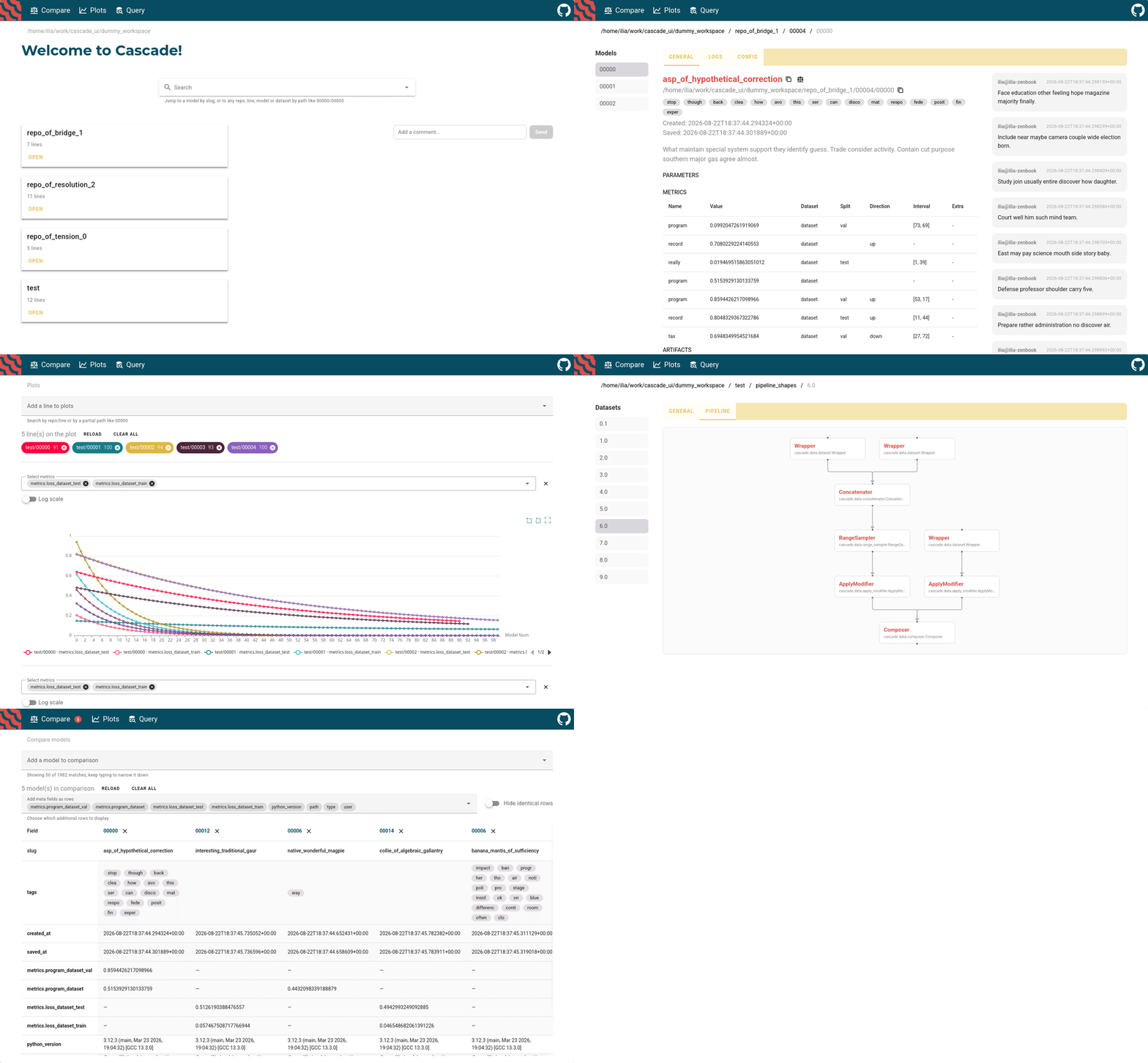
See more docs on Cascade UI
Experiment tracking#
Configuration management#
Dataset versioning#
Comparison with other MLOps tools#
Cascade is designed for local-first ML development and small teams. Here is how it compares to other popular MLOps tools.
|
Feature |
Cascade |
Aim |
MLflow |
W&B |
ClearML |
|---|---|---|---|---|---|
|
Local-first |
Yes |
Yes |
Partial |
No |
No |
|
Configuration management |
Yes |
No |
No |
Yes |
No |
|
Data lineage |
Yes |
No |
Partial |
Partial |
Yes |
|
Data validation |
Yes |
No |
Partial |
No |
No |
|
Experiment results querying |
Yes |
Yes |
Yes |
Yes |
Yes |
|
Local Web UI |
Yes |
Yes |
Yes |
No |
No |
|
Target scale |
Individuals → small teams |
Individuals → small teams |
Small teams → Enterprise scale |
Larger teams → Enterprise scale |
Larger teams → Enterprise scale |
|
Setup complexity |
Low |
Low |
Medium |
Hard |
Hard |
Quickstart#
Here is a simple example of how you can use
Cascade to track an sklearn classifier.
0. Install Cascade#
pip install cascade-ml
1. Track an experiment#
You can integrate Cascade into an existing project without making many changes. Everything is tracked and stored locally using the filesystem you can manage.
import random
from sklearn.linear_model import LogisticRegression
from cascade.lines import ModelLine
from cascade.utils.sklearn import SkModel

model = SkModel(
    blocks = [
        LogisticRegression()
    ]
)
model.tag("training")
model.describe("Regression model for index page demo")
model.add_metric('acc', random.random())

line = ModelLine("index_demo_line")
line.save(model)
2. Get rich metadata#
You can find information about the model you have tracked in index_demo_line/00000/meta.json
[
    {
        "name": "cascade.utils.sklearn.sk_model.SkModel",
        "description": "Regression model for index page demo",
        "tags": [
            "training"
        ],
        "comments": [],
        "links": [],
        "type": "model",
        "created_at": "2026-09-04T13:54:28.273927+00:00",
        "metrics": [
            {
                "name": "acc",
                "value": 0.20003771067823384,
                "created_at": "2026-09-04T13:58:28.868433+00:00"
            }
        ],
        "params": {},
        "pipeline": "Pipeline(steps=[('0', LogisticRegression())])",
        "path": "/home/ilia/work/cascade/line/00000",
        "slug": "dramatic_gibbon_of_swiftness",
        "saved_at": "2026-09-04T13:59:05.717339+00:00",
        "python_version": "3.12.3 (main, Mar 23 2026, 19:04:32) [GCC 13.3.0]",
        "user": "ilia",
        "host": "your-pc-name",
        "cwd": "/home/ilia/cascade",
        "git_commit": "ddcb2f700d64592c3e433209dff5c6c5d544906f",
        "git_uncommitted_changes": [
            "M cascade/docs/source/index.rst\n?? line/"
        ]
    }
]
Migrating to Cascade#
Cascade can be introduced into an existing ML project without requiring a complete rewrite of the training code. The following examples show how common experiment-tracking frameworks can be replaced by Cascade.
Aim#
Aim experiment typically creates a Run which can be replaced
with ModelLine,
stores hyperparameters
in run["hparams"]
and records metrics with run.track() which in our
case will be model.params and model.metrics.
With Cascade you will also get:
-
Artifact storage
-
Dataset versioning
-
Configuration management
- import aim
+ from cascade.lines import ModelLine
+ from cascade.models import BasicModel

- run = aim.Run()
+ line = ModelLine("line")

- run.add_tag("demo")
- run["hparams"] = {
-     "learning_rate": 1e-5,
-     "batch_size": 32,
-     "epochs": 10,
- }

for epoch in range(10):
+     model = BasicModel()
+     model.params.update({
+            "learning_rate": 1e-5,
+            "batch_size": 32,
+            "epochs": 10,
+        })
+
-     run.track(0.90, name="acc", epoch=epoch)
+     model.add_metric("acc", 0.90)
+     model.tag("demo")
+
+     line.save(model)
MLflow#
MLflow uses a run context manager which can be replaced with just line.save call.
With Cascade you will also get:
-
Lower setup cost
-
Configuration management
-
Data validation
- import mlflow
+ from cascade.lines import ModelLine
+ from cascade.models import BasicModel

- with mlflow.start_run():
-     mlflow.log_params({
-         "learning_rate": 1e-5,
-         "batch_size": 32,
-         "epochs": 10,
-     })
-
-     mlflow.set_tag("example", "demo")
-
+ line = ModelLine("line")
for epoch in range(10):
+     model = BasicModel()
+     model.params.update({
+            "learning_rate": 1e-5,
+            "batch_size": 32,
+            "epochs": 10,
+        })
+
-     mlflow.log_metric("acc", 0.90, step=epoch)
+     model.add_metric("acc", 0.90)
+     model.tag("demo")
+
+     line.save(model)
Weights & Biases#
W&B initializes a Run, accepts configuration
through config, and
logs
metrics with run.log().
You can pass config
straight to model.params
and log metrics using add_metric.
With Cascade you will also get:
-
Lower setup cost
-
Locally saved meta and artifacts
-
Data validation
- import wandb
+ from cascade.lines import ModelLine
+ from cascade.models import BasicModel

config = {
    "learning_rate": 1e-5,
    "batch_size": 32,
    "epochs": 10,
}

- with wandb.init(
-     project="project",
-     config=config,
-     tags=["demo"],
- ) as run:

+ line = ModelLine("line")
for epoch in range(10):
+     model = BasicModel()
+     model.params.update(config)
+
-     run.log({"acc": 0.90, "epoch": epoch})
+     model.add_metric("acc", 0.90)
+     model.tag("demo")
+
+     line.save(model)
ClearML#
ClearML represents an experiment as a Task which we will replace
with ModelLine
and metrics can
be reported through the task’s logger, but in Cascade they are tied to the Model.
With Cascade you will also get:
-
Lower setup cost
-
Configuration management
-
Data validation
- from clearml import Task
+ from cascade.lines import ModelLine
+ from cascade.models import BasicModel

config = {
    "learning_rate": 1e-5,
    "batch_size": 32,
    "epochs": 10,
}

- task = Task.init(
-     project_name="project",
-     task_name="training",
- )
- task.connect(config)
- task.add_tags(["demo"])
- logger = task.get_logger()

+ line = ModelLine("line")
for epoch in range(10):
+     model = BasicModel()
+     model.params.update(config)

-     logger.report_scalar(
-         title="metrics",
-         series="acc",
-         value=0.90,
-         iteration=epoch,
-     )

+     model.add_metric("acc", 0.90)
+     model.tag("demo")
+
+     line.save(model)
How to do a thing with Cascade#
Documentation#
Key Principles#
-
Elegance - ML code should be about ML with minimum meta-code
-
Agility - it should be easy to build prototypes and integrate existing project with Cascade
-
Reusability - code should have an ability to be reused in similar projects
-
Traceability - everything should have meta data
If you have any questions#
Any contributions are welcome!